MIRON RS · AI MODULE PLATFORM · EARLY ACCESS

Switch a module on — get the result

A platform for restaurants, cafés and delivery: connect your POS, switch on the AI modules you need and see the whole business on one screen. One subscription instead of five contractors for five jobs.

  • Works on top of your POS: iiko and Syrve first
  • Each module switches on and off in one click
  • Money, discounts and public replies only after you
  • Finance
  • Reputation
  • Purchasing
  • AI Concierge
  • AI head of sales
  • AI Chef
TEAM DASHBOARD

What it looks like at work

The office of a restaurant AI team: every agent is a Miron RS module. You see who is doing what, and where the team stops for your decision.
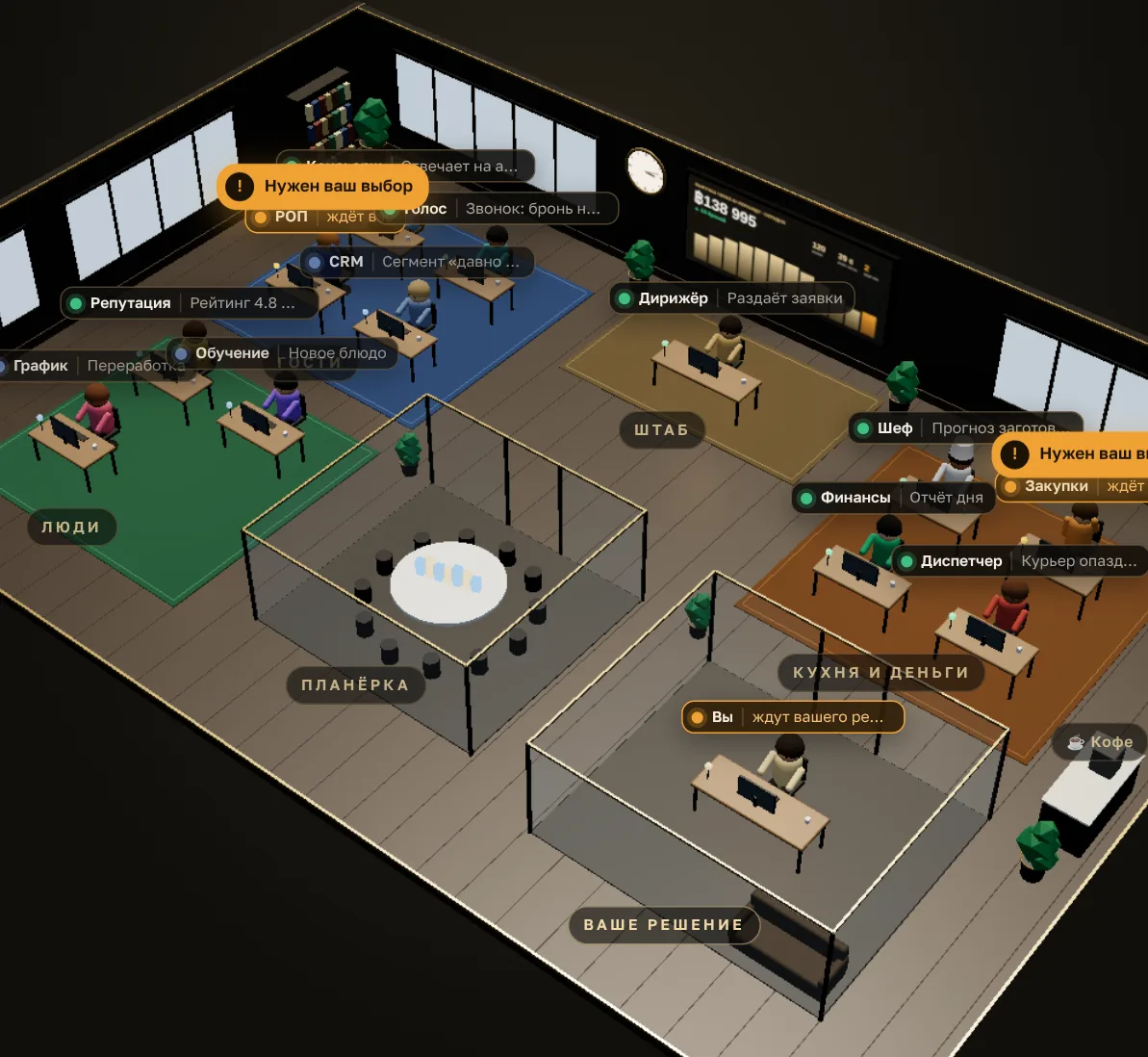
3D office of a restaurant AI team: every agent is a Miron RS moduleLive demo
  • Every desk is a moduleFinance, Purchasing, Reputation, Concierge and the rest work like staff with a clear job
  • You see who is doing whatAbove each desk: what the agent is doing right now — an invoice, a review, a booking, a call
  • Decisions stay with youA discount, a price jump or a public reply: the agent stands up and waits for your yes or no
  • The day’s numbers on one screenRequests, bookings, revenue via agents and hours saved

Today an owner pays five people and still lacks the full picture

A buyer, a marketer, a review agency, an outsourced accountant, a host on the phone. Each sees their own piece, and you assemble the numbers. Miron RS does this work as modules and brings it onto one screen.

01

Connect your POS

Miron reads sales, discounts, shifts and stock. You keep your POS.

02

Switch modules on

Finance, Reputation, Purchasing, Concierge — as many as you need. Switch off and the data stays for 90 days.

03

See the result

One screen for the day, week and month. Each morning the AI Director tells you what to do today.

MODULES

Modules

Every module is a standalone AI module: it switches on alone and works without the others, and together modules are stronger. Tap a module to see the pains it closes, how the AI works and every function.

Working today2

AI moduleWorking today

AI Concierge

Answers guests in messengers 24/7, books tables and takes orders. Risk and money go to you.

14 functions · 4 metricsDetails +Collapse −

Works on its own

Pains it closes
  • Guests message at night and at weekends, nobody answers and the booking goes next door
  • The host answers the same questions and loses requests across five messengers
  • A wrong answer about ingredients or allergens hits your reputation
How the AI works
  1. Reads the guest’s message in WhatsApp, Telegram, Instagram or on your site
  2. Answers only from your venue card: menu, hours, prices, rules
  3. Takes the booking or order and hands you a ready request
  4. Allergies, payments, complaints and refunds go straight to a person
Numbers it moves
  • First response time
  • Share of requests closed without a person
  • Bookings and orders via the concierge
  • Revenue from conversations
What it needs to connect

WhatsApp, Telegram, Instagram or a site widget plus your venue card; bookings through your booking system or POS.

What it does
  • One conversation log for every messenger and the site
  • Table bookings and pre-orders
  • Delivery and pick-up orders
  • Answers on menu, prices, hours and parking from your data only
  • English, Russian and other languages
  • A person can take over any conversation
  • A ready request in the CRM or the manager’s Telegram
  • Report: requests, bookings and revenue via the concierge
  • Booking confirmation and reminder to the guest
  • Waitlist and booking changes
  • Deposit by payment link — confirmed by a person
  • Event enquiries handed to the Events module
  • Review request after the visit
  • Tone of voice matched to your brand
Why it beats typical solutions
  • Answers only from your venue card — never invents prices, ingredients or parking
  • Allergens, payments, refunds and complaints always go to a person
  • One log for every channel instead of five apps
  • Every conversation is checked by the AI head of sales — quality is visible, not assumed
What it leads to

No request goes unanswered, and your host looks after guests in the room instead of chats.

What it replaces: a host on the phone and in messengers

Open the product →
AI moduleWorking today

AI head of sales

Checks every call and chat and shows where sales leak.

13 functions · 4 metricsDetails +Collapse −

Works on its own

Pains it closes
  • You don’t know what staff tell guests or why a booking fell through
  • You can check a couple of calls a week — the rest is blind
  • The sales script exists on paper and nobody follows it
How the AI works
  1. Listens to and reads 100% of guest calls and chats
  2. Checks every conversation against your script and standards
  3. Shows a quote from the conversation for every scored point
  4. Builds a report and alerts the manager on critical mistakes
Numbers it moves
  • Enquiry-to-booking conversion
  • Share of conversations on script
  • Average service score
  • Lost revenue by reason
What it needs to connect

Call recordings from your telephony, messenger chats and your sales script.

What it does
  • Every conversation scored, not a sample
  • A checklist built from your sales and service script
  • A quote as evidence for each point
  • Banned phrases with an alert
  • Staff ranking and weekly trend
  • Checks both live staff and the AI Concierge
  • Reasons behind lost bookings and orders
  • Training recommendations
  • Lost-booking analysis: why the guest didn’t book
  • Upsell control in conversations
  • Response speed of every employee
  • Weekly owner report
  • Shift and venue comparison
Why it beats typical solutions
  • Checks 100% of conversations, not a 3–5% sample
  • Every score is backed by a quote — nothing to argue about
  • Scores people and AI against one standard
  • Never punishes on its own: decisions about people stay with the manager
What it leads to

You see where sales leak and fix it with training, not guesses. Decisions about people stay with you.

What it replaces: a head of sales, mystery shoppers and spot-check listening

Open the product →

First wave · at launch5

AI module$99/mo

Finance

A daily P&L from the POS: where money leaks, discounts, voids and refunds.

14 functions · 5 metricsDetails +Collapse −

Works on its own

Pains it closes
  • You see revenue, but profit only at month end from the accountant
  • Discounts, voids and refunds quietly eat money
  • The POS has reports, but there is no time to read them
How the AI works
  1. Every night pulls checks, discounts, voids, payments and purchase prices from the POS
  2. Builds a daily P&L and compares it with the same period before
  3. Finds anomalies: a spike in discounts, voids after the bill, rising food cost
  4. Sends a morning brief and answers questions about your numbers
Numbers it moves
  • Food cost, %
  • Prime cost, %
  • Discounts and voids share
  • Daily profit
  • Average check
What it needs to connect

Access to your POS (iiko, Syrve, Toast, Square, Poster and others); for food cost — Purchasing or invoices.

What it does
  • Daily P&L per venue and per chain
  • Revenue by hour, server, dish, channel, payment and floor zone
  • Control of discounts, voids, refunds and pre-bills
  • Food cost and margin per dish from real purchase prices
  • Alert on a purchase price jump
  • Aggregator and card fees in the P&L
  • Dashboard: day, week, month, quarter, year vs the previous period
  • Drill down from any number to the original check
  • Ask your numbers in plain language
  • Prime cost: food cost plus labour
  • Break-even point and monthly plan vs actual
  • Weekly revenue forecast
  • Cash discrepancies and shift close control
  • Venue comparison across a chain
Why it beats typical solutions
  • Money is counted in whole cents — no rounding errors
  • Any number opens down to the original check
  • Food cost from the real invoice price, not a reference table
  • Runs on top of your POS — no need to switch
What it leads to

You see profit every day, not once a month, and close leaks before they become habits.

What it replaces: an outsourced finance director and manual Excel reports

AI module$39/mo

Reputation

Yandex, 2GIS and Google reviews in one window. Replies go out after you approve.

13 functions · 4 metricsDetails +Collapse −

Works on its own

Pains it closes
  • Reviews on Google, Yandex and 2GIS sit unanswered for weeks
  • One angry review with no reply scares off new guests
  • An agency replies with templates everyone can spot
How the AI works
  1. Collects every map review into one inbox
  2. Tags tone and topic: kitchen, service, speed, price
  3. Drafts a reply in your brand’s voice
  4. Publishes after your OK; for 1–3 stars it opens a guest-recovery task
Numbers it moves
  • Average rating across platforms
  • Share of reviews answered
  • Reply time
  • Complaints by topic
What it needs to connect

Links to your Google, Yandex Maps and 2GIS listings; publishing through the listing owner’s access.

What it does
  • One inbox for Google, Yandex Maps, 2GIS and other platforms
  • Tone and topic tags
  • A reply draft in your venue’s style
  • Published only after approval
  • Guest-recovery task for 1–3 stars
  • Reply speed and rating per venue
  • Weekly complaint topics — what to fix first
  • Every guest gets the review link; no filtering out unhappy ones
  • Mentions on booking and delivery platforms
  • Rating against your nearest competitors
  • Templates the AI adapts to every review
  • Manager alert on negative reviews within minutes
  • Staff guests mention most
Why it beats typical solutions
  • Never hides unhappy guests — works within platform rules
  • Replies sound like a person, not a template
  • A complaint becomes a task with an owner
  • Complaint topics link to training and service — the cause gets fixed
What it leads to

Every review gets a same-day reply, and complaints become a task list instead of a falling rating.

What it replaces: an SMM manager and a review agency

AI module$69/mo

Purchasing

Suppliers, price lists, orders and invoices from a photo. Price jumps come to you.

14 functions · 4 metricsDetails +Collapse −

Works on its own

Pains it closes
  • Supplier prices rise and you find out from the invoice
  • Orders live in messengers and nobody remembers who ordered what
  • Invoices are retyped by hand and errors surface at stock-take
How the AI works
  1. Keeps your suppliers with current price lists and priority
  2. Builds the order from stock and forecast and shows where it is cheaper
  3. Reads the invoice from a photo and matches it to the order
  4. Price jumps, mismatches and duplicates come to you; the order goes after your OK
Numbers it moves
  • Purchase price of key items
  • Share of orders at the best price
  • Receiving mismatches
  • Time per order
What it needs to connect

Your suppliers and price lists (file, photo or email); for stock — the POS or the Stock module.

What it does
  • Supplier book: contacts, tax IDs, address, terms
  • Your own suppliers plus suggestions by city and product type
  • Supplier priority with a fallback
  • Current price lists and promos, compared per item
  • A switch-supplier recommendation only with your consent
  • Orders, order history and who ordered
  • Invoice from a photo, file or voice, matched to the order
  • Price-jump report for negotiations
  • Posting to the POS and accounting after approval
  • One item from several suppliers and pack sizes
  • Price per unit of measure comparison
  • Supplier delivery days and minimum orders
  • Supplier payment due dates
  • Order sent to the supplier by messenger or email
Why it beats typical solutions
  • No order, supplier switch or price jump goes through without your OK
  • Mismatches and duplicates never reach the POS or accounting on their own
  • The invoice price instantly recalculates costs in the AI Chef
  • Supplier details stay with you, not in someone else’s closed catalogue
What it leads to

You buy at the best price, see every price-list change and stop retyping invoices.

What it replaces: a buyer and separate purchasing and invoice tools

AI moduleIncluded in packages

AI Director

A morning brief across all modules and answers about your numbers.

12 functions · 3 metricsDetails +Collapse −

Works on its own

Pains it closes
  • Understanding how the day went means opening five programs
  • There is no time to read the numbers and decide what to do today
  • “Why did revenue drop?” stays unanswered
How the AI works
  1. Reads the data of every module you switched on
  2. Each morning sends a brief: what happened, what matters, what to do today
  3. Answers questions about your numbers by text or voice
  4. Connects events between modules — this is where synergy lives
Numbers it moves
  • Revenue and profit vs plan
  • Signals closed
  • Time spent on management routine
What it needs to connect

Comes with any module and works on their data.

What it does
  • Morning brief per venue and chain in Telegram or email
  • A prioritised “do today” list
  • Ask by voice or text: “why is this Tuesday worse than last?”
  • Compare venues and periods
  • Signals from every module in one feed
  • Weekly and monthly review
  • Works only on the modules you switched on
  • Monthly goals and progress
  • “Decide today” signals kept apart from “for information”
  • Voice answers on the go
  • Brief for partners and investors
  • Decision history
Why it beats typical solutions
  • Sees links between modules that separate reports never show
  • Tells you what to do, not just shows charts
  • Answers from your data, not generic advice
  • Never acts on its own — it proposes, you decide
What it leads to

Five minutes in the morning and you know the state of the business and the three things to do today.

What it replaces: a consultant and part of a manager’s job

AI moduleFree

Start from paper

Moves Excel, notebooks and till reports into the system. Free.

10 functions · 2 metricsDetails +Collapse −

Works on its own

Pains it closes
  • Records live in a notebook and Excel; there is no POS or it doesn’t export
  • Moving to a new system feels long and expensive
  • Without numbers in the system, AI modules have nothing to work on
How the AI works
  1. Takes photos of the notebook, Excel sheets and till reports
  2. Reads and maps the data into one model
  3. Shows what it couldn’t read and asks you to confirm
  4. Starts the other modules on the imported data
Numbers it moves
  • Share of data imported
  • Time to the first report
What it needs to connect

Photos, Excel, Google Sheets or POS exports.

What it does
  • Photos of notebook pages and receipts
  • Excel and Google Sheets import
  • Till Z-reports and exports
  • Review of doubtful lines
  • Dish, supplier and staff directory
  • Free
  • Handwriting recognition
  • Tips on which data to start collecting
  • Past months imported for comparison
  • Help choosing a POS if you have none
Why it beats typical solutions
  • You don’t need a POS to start
  • Unreadable lines are never passed off as data — doubtful lines are shown
  • Free: you pay only for the modules you switch on
What it leads to

You start from the records you have today, without a consultant and without changing your POS.

What it replaces: an implementation consultant

Stronger together with:FinancePurchasingAI Director

Second wave11

AI module$69/mo

AI Chef

Recipe cards, food cost, menu matrix, prep forecast.

13 functions · 4 metricsDetails +Collapse −

Works on its own

Pains it closes
  • Dish costs were calculated once and are long out of date
  • Prep is done by eye: either you run out or you throw food away
  • You don’t know which dishes drag the menu margin down
How the AI works
  1. Keeps recipe cards and costs them at the latest confirmed purchase price
  2. Builds a menu matrix: popularity against margin
  3. Forecasts daily prep from sales history
  4. Suggests what to reprice, remove or promote
Numbers it moves
  • Food cost per dish, %
  • Menu margin
  • Prep waste
  • Share of “star” dishes
What it needs to connect

Recipe cards (file or photo), POS sales, prices from Purchasing or invoices.

What it does
  • Recipe cards with yield, waste and allergens
  • Cost from the latest confirmed invoice price
  • Recalculation when a supplier raises prices
  • Menu matrix: stars, plowhorses, puzzles, dogs
  • Prep plan per day and shift
  • Dish card with photo and plating standard
  • Allergens on every card
  • No sales history — no forecast, nothing invented
  • Seasonal menus and new dishes tested on margin
  • Yield and processing loss control
  • Plating standard with a photo for cooks
  • Menu price for a target food cost
  • Semi-finished items and prep tracking
Why it beats typical solutions
  • Costs come from a confirmed price, not a recognition draft
  • Prep is forecast only with sales history — no invented numbers
  • Linked to Purchasing and Finance: a supplier price rise shows in margin at once
  • Allergens on every card protect both the guest and the venue
What it leads to

The menu earns more, with less waste and fewer “sold out by eight”.

What it replaces: a food technologist and a costing calculator

AI module$39/mo

Training

Tests built from your standards, clearance for a shift.

13 functions · 4 metricsDetails +Collapse −

Works on its own

Pains it closes
  • New staff learn by word of mouth and leave within a month
  • Standards exist in documents, yet nobody knows them
  • You can’t tell who is really ready for a shift
How the AI works
  1. Turns your standards, menu and procedures into short lessons and tests
  2. Assigns training by role and venue
  3. Checks knowledge and clears people for shifts
  4. Reminds about overdue training and sends people to retake
Numbers it moves
  • Share of cleared staff
  • Average test score
  • Time to a solo shift
  • New-hire turnover
What it needs to connect

Your standards, menu and procedures in any form — document, photo, video.

What it does
  • Lessons from your files, photos and videos
  • A ready library for service and kitchen
  • Every test question is backed by your source text
  • Assignment by role and venue
  • Shift clearance and certification dates
  • Overdue reminders
  • A test triggered by the AI head of sales or Reputation
  • Progress for every employee
  • Day-by-day onboarding for new hires
  • Upsell and guest conversation practice
  • Menu and allergen knowledge with dish photos
  • Certificates and training history
  • Training in several languages
Why it beats typical solutions
  • Teaches your standards, not generic courses
  • Never invents an exam from an empty file — every question comes from your text
  • Linked to the rota: no clearance, no shift
  • Assigns training from real mistakes in reviews and conversations
What it leads to

New staff are shift-ready sooner, and everyone knows the standards, not just the seniors.

What it replaces: a trainer and a separate training platform

AI module$69/mo

Rota and leave

Shifts by the sales forecast, leave and cover.

13 functions · 4 metricsDetails +Collapse −

Works on its own

Pains it closes
  • The rota is built at night in Excel and someone still doesn’t show up
  • Leave overlaps and you look for cover at the last minute
  • Labour cost grows faster than revenue
How the AI works
  1. Builds shifts around the sales forecast and covers
  2. Accounts for leave, preferences and training clearance
  3. Warns about overtime and shifts that cost more than they bring
  4. Staff swap shifts and the manager approves
Numbers it moves
  • Labour cost, % of revenue
  • Sales per labour hour
  • Overtime
  • Uncovered shifts
What it needs to connect

Staff list and rates; POS sales for the forecast.

What it does
  • Shift calendar per venue
  • Sales forecast vs labour cost before the rota goes out
  • Leave, remaining days and clashes with key shifts
  • Day-off requests and shift swaps with approval
  • Overtime warnings
  • No shift without training clearance
  • Sales per labour hour vs last week
  • Staff notifications in messengers
  • Clock-in and clock-out
  • Skills and rates in planning
  • Weekly rota templates
  • Multi-venue rotas and staff transfers
  • Timesheet for payroll
Why it beats typical solutions
  • Sales forecast first, rota second — not the other way round
  • Knows who is cleared and who isn’t
  • Warns about overtime before publishing, not after
  • The timesheet goes straight into payroll
What it leads to

The rota is covered in advance, staffing matches demand and labour cost stays under control.

What it replaces: the manager’s Excel and a separate scheduling tool

AI module$69/mo

CRM and marketing

Guest card, segments, campaigns that bring revenue.

13 functions · 4 metricsDetails +Collapse −

Works on its own

Pains it closes
  • A guest came once and vanished — you don’t know who they are or how to bring them back
  • Campaigns go to everyone and annoy people
  • You can’t tell whether a promotion made money
How the AI works
  1. Builds a guest card from visits, checks and favourite dishes
  2. Splits guests into segments: new, regular, lapsed, big spenders
  3. Runs campaigns by rules — the right moment for the right segment
  4. Counts campaign revenue from POS visits, not opens
Numbers it moves
  • Returning guest share
  • Visit frequency
  • Campaign revenue
  • Guest churn
What it needs to connect

POS and bookings for visits; channels — email, SMS, Telegram, WhatsApp.

What it does
  • Guest card: visits, average check, favourite dishes, birthdays
  • Segments: new, regular, lapsed, big spender
  • Campaigns by email, SMS, Telegram and WhatsApp
  • Quiet-hour offers and win-back of lapsed guests
  • Guest consent to messages
  • Discounts in campaigns are issued by the owner
  • Campaign revenue from POS visits
  • No bought contact lists
  • Journeys: birthday, first visit, haven’t seen you in a while
  • A/B test of campaign copy
  • One-click unsubscribe
  • Personal offers based on favourite dishes
  • Guest card linked to their reviews
Why it beats typical solutions
  • Counts campaign revenue from checks, not email opens
  • Only the owner can issue a discount in a campaign
  • Only with guest consent and only your own list
  • POS, bookings, concierge and loyalty data in one card
What it leads to

Guests come back more often, and you see which campaign brought money.

What it replaces: a marketer and a separate restaurant CRM

AI module$39/mo

Hygiene and checklists

Opening and closing, HACCP, photo reports.

12 functions · 3 metricsDetails +Collapse −

Works on its own

Pains it closes
  • Opening and closing depend on the senior’s memory
  • Inspections catch you off guard: logs are missing or backfilled
  • The fridge temperature is “probably fine”
How the AI works
  1. Gives staff shift checklists on their phones
  2. Asks for a photo where it matters
  3. Keeps HACCP and temperature logs
  4. Alerts the manager about missed or overdue items
Numbers it moves
  • Share of items done
  • Violations by zone
  • Log readiness
What it needs to connect

Your standards or ready templates; staff phones.

What it does
  • Opening, closing and cleaning checklists
  • Photo proof per item
  • HACCP and temperature logs
  • Schedules and reminders
  • Missed-item alerts
  • Venue audit with a standards score
  • Comparison across a chain
  • Geotag when an item is done
  • Goods receiving checklists
  • Expiry date control
  • Instructions and a reference photo inside each item
  • Violations by shift
Why it beats typical solutions
  • A photo proves the job — no quiet backfilling
  • Logs are always inspection-ready
  • The manager sees a miss at once, not at month end
What it leads to

Order in the kitchen and the room holds every day, not only before an inspection.

What it replaces: paper logs, an outside auditor and a checklist app

AI modulePrice at launch

Stock and inventory

Counts from a phone, expected vs actual, write-offs.

12 functions · 3 metricsDetails +Collapse −

Works on its own

Pains it closes
  • Stock-take takes a whole night and still doesn’t add up
  • You can’t see where product goes: write-offs, spoilage or theft
  • Stock in the POS and on the shelf live separate lives
How the AI works
  1. Runs counts from a phone by zone and shelf
  2. Compares expected against actual
  3. Breaks variances down by cause
  4. Feeds stock to Purchasing and costs to the AI Chef
Numbers it moves
  • Expected vs actual variance
  • Write-offs, % of revenue
  • Stock-take time
What it needs to connect

POS with inventory or the Purchasing module; a staff phone.

What it does
  • Counting from a phone with a barcode scanner
  • Expected vs actual per item
  • Write-offs with reason and photo
  • Transfers between venues and kitchens
  • Variances by shift and person responsible
  • Par levels and shortage alerts
  • Stock flows straight into the supplier order
  • Stock-take in parts, zone by zone
  • Containers and spirits counted by volume
  • Variance causes by person
  • Shortage forecast
  • Stock-takes compared across periods
Why it beats typical solutions
  • A variance is broken down by cause, not one number
  • Stock feeds the order and costs at once
  • Counting from a phone with no paper sheets
What it leads to

Stock-take takes hours, not a night, and you see where product goes.

What it replaces: manual counting and outside stock audits

Stronger together with:PurchasingAI ChefFinance
AI modulePrice at launch

Delivery aggregators

One menu and stop list for every platform, their fees in the P&L.

11 functions · 4 metricsDetails +Collapse −

Works on its own

Pains it closes
  • Menus and stop lists are changed separately on every platform
  • Orders from aggregator tablets are retyped into the POS
  • Platform fees eat margin but don’t show in reports
How the AI works
  1. Keeps one menu and one stop list for every platform
  2. Takes aggregator orders into one window and sends them to the POS
  3. Puts each platform’s fees into the P&L
  4. Shows which dishes and platforms really make money
Numbers it moves
  • Margin after fees
  • Cancelled order share
  • Prep time
  • Platform rating
What it needs to connect

Delivery platform dashboards and your POS.

What it does
  • One menu for Uber Eats, DoorDash, Grab, Yandex Eats and others
  • One-click shared stop list
  • Every platform’s orders in one window
  • Orders into the POS with no retyping
  • Platform fees and payouts in the P&L
  • Margin per platform and dish
  • Rating and prep time on each platform
  • Different prices per platform
  • Platform promotions in one calendar
  • Delivery reviews in the Reputation module
  • Pause orders when the kitchen is overloaded
Why it beats typical solutions
  • Fees show in profit, not only in revenue
  • One action instead of editing the menu in every dashboard
  • Orders reach the POS with no retyping
What it leads to

Fewer mistakes and less retyping, and you know exactly what each platform keeps.

What it replaces: aggregator tablets and separate delivery hubs

AI modulePrice at launch

Loyalty

Points, cashback, gift cards, passes.

11 functions · 3 metricsDetails +Collapse −

Works on its own

Pains it closes
  • Paper stamp cards and “friends” discounts are never counted
  • There is a loyalty programme, but guests forget about it
  • You can’t tell whether cashback pays off
How the AI works
  1. Runs points, cashback and guest tiers
  2. Earns and redeems through the POS
  3. Reminds guests about points at the right time
  4. Counts the revenue the programme brings
Numbers it moves
  • Share of checks with a card
  • Member visit frequency
  • Programme cost, % of revenue
What it needs to connect

POS for earning and redeeming.

What it does
  • Points, cashback and tiers
  • Gift cards and passes
  • Guest card in the phone wallet
  • Earn and redeem through the POS
  • Expiring-points reminders
  • Programme payback
  • Discount rules set by the owner
  • Refer-a-friend programme
  • Points for a review and a birthday
  • Limits so points don’t eat margin
  • Segments by guest tier
Why it beats typical solutions
  • You see what the programme earns and what it costs
  • The owner sets the rules — no uncontrolled discounts
  • Linked to the CRM: points are part of win-back journeys
What it leads to

Guests come back for their points, and you see what the programme earns and costs.

What it replaces: a separate loyalty service

AI module$39/mo

Documents and deadlines

Invoices and contracts from a photo, e-invoicing, accountant pack, licence deadlines.

13 functions · 3 metricsDetails +Collapse −

Works on its own

Pains it closes
  • Health certificates, licences and leases expire out of the blue
  • The accountant waits weeks for invoices and you retype them
  • E-invoicing and compliance systems live in separate windows
How the AI works
  1. Reads a document from a file, photo or voice into a draft
  2. Sorts by date, supplier, amount and status
  3. Reminds about certificate, licence, lease and inspection dates
  4. Builds the accountant’s pack from approved lines; signing and posting happen after you
Numbers it moves
  • Unsigned documents
  • Missed deadlines
  • Time to prepare the accountant pack
What it needs to connect

Your e-invoicing provider and e-signature; accounting through export; compliance systems as add-on connectors.

What it does
  • Documents from a photo, camera, file or voice
  • Sorting by date, supplier, amount and status
  • Deadlines for certificates, licences, leases and inspections
  • E-signature after approval
  • E-invoicing through your provider
  • Accountant pack and accounting export after approval
  • Compliance systems through add-on connectors
  • A photo with no readable text never becomes a document on its own
  • Reconciliation statements with suppliers
  • Searchable contract storage
  • Recognition of invoices and tax documents
  • Signed vs unsigned document control
  • Lease renewal reminders
Why it beats typical solutions
  • Nothing is posted or signed without approval
  • A photo with no text never becomes a document — no junk in the books
  • Linked to Purchasing: the invoice is matched to the order
What it leads to

No deadline expires by surprise, and the accountant gets a ready pack instead of a pile of paper.

What it replaces: manual document entry and deadlines kept in your head

Stronger together with:PurchasingFinanceRota and leave
AI modulePrice at launch

Site, QR menu and ordering

A site and QR menu from your POS, online orders with no aggregator fee.

12 functions · 3 metricsDetails +Collapse −

Works on its own

Pains it closes
  • There is no site or it is outdated, and nobody reads the PDF menu
  • Every aggregator order pays them a commission
  • Guests want to order from the table by QR and can’t
How the AI works
  1. Builds a site and QR menu from your POS data and venue card
  2. Takes online orders and payments with no aggregator commission
  3. Keeps menu, prices and stop list up to date on its own
  4. Sends the guest to the CRM for repeat orders
Numbers it moves
  • Direct order share
  • Site-to-order conversion
  • Online average check
What it needs to connect

POS for menu and prices; your domain; a payment provider.

What it does
  • A venue site in an hour from your data
  • QR menu on tables, updated from the POS
  • Online delivery and pick-up orders
  • Order and pay from the table
  • Stop list and prices in sync with the POS
  • Your domain and style
  • Guests land in the CRM
  • Table booking on the site
  • Menu pages search engines can find
  • Tips and a review after paying at the table
  • Menu in several languages
  • Site order analytics
Why it beats typical solutions
  • Direct orders with no aggregator fee
  • Menu and stop list update from the POS with no manual edits
  • The guest stays yours: they land in the CRM
What it leads to

Part of your orders come direct with no aggregator fee, and the menu is always current.

What it replaces: a web studio and restaurant site builders

AI modulePrice at launch

Hiring

Vacancies, candidate replies, screening and trial shifts.

12 functions · 3 metricsDetails +Collapse −

Works on its own

Pains it closes
  • Vacancies hang for weeks and candidates don’t show up
  • The manager spends hours calling candidates
  • A new hire leaves after a week
How the AI works
  1. Writes and posts the vacancy on Indeed, hh.ru, Telegram and other boards
  2. Answers candidates and screens them first
  3. Books the interview and the trial shift
  4. Hands the new hire to Training and the Rota
Numbers it moves
  • Time to fill
  • Share reaching interview
  • 30-day new-hire retention
What it needs to connect

Job board accounts and the manager’s calendar.

What it does
  • Vacancy text per role and venue
  • Posting on Indeed, hh.ru and Telegram
  • Replies to candidates 24/7
  • First screening by your requirements
  • Interview booking into the calendar
  • Trial shift and onboarding
  • Funnel: applications, interviews, starts
  • The hiring decision stays with a person
  • Service knowledge test before the interview
  • Document check before the first shift
  • Seasonal talent pool
  • Re-contact strong candidates
Why it beats typical solutions
  • Candidates get an answer at once — fewer drop out
  • Linked to Training: the new hire starts with an onboarding plan
  • The hiring decision always stays with a person
What it leads to

Vacancies close faster and the manager spends time only on strong candidates.

What it replaces: a recruiter and a staffing agency

Stronger together with:TrainingRota and leave

Third wave9

AI module$99/mo

Floor service

Service speed, tables, waiter coaching.

11 functions · 3 metricsDetails +Collapse −

Works on its own

Pains it closes
  • Guests wait for the server, the food and the bill, and you learn it from reviews
  • You can’t tell which server sells and which loses the check
  • The manager can’t be everywhere at once
How the AI works
  1. Measures service speed from POS data: order, serve, pay
  2. Sees table and zone occupancy
  3. Compares servers by check, upsell and speed
  4. Prompts the manager during the shift
Numbers it moves
  • Time to order and serve
  • Table turnover
  • Average check per server
What it needs to connect

POS with table and order-time data.

What it does
  • Time from seating to order, serve and payment
  • Live table and zone occupancy
  • Long-wait alerts
  • Average check and upsell per server
  • Server coaching from their own numbers
  • Link to service reviews
  • Shift summary for the manager
  • “Table left alone” alert
  • Serve speed by kitchen station
  • Seating that balances server load
  • Shift comparison by speed
Why it beats typical solutions
  • Service is measured from POS data, not by eye
  • Linked to reviews — you see how speed moves the rating
  • Coaching from each server’s own numbers
What it leads to

Guests wait less, the average check grows and the manager sees the whole room.

What it replaces: part of the floor manager’s job

AI module$99/mo

Voice host

Calls, bookings and orders by voice.

12 functions · 3 metricsDetails +Collapse −

Works on its own

Pains it closes
  • Nobody picks up at peak hours, so the guest calls elsewhere
  • The host on the phone can’t get to guests in the room
  • At night and at weekends the phone goes unanswered
How the AI works
  1. Answers the call by voice and says up front that it is AI
  2. Takes bookings and orders from the live menu and stop list
  3. Answers common questions from your venue card
  4. Complaints, allergies and tricky questions go to a person
Numbers it moves
  • Answered call share
  • Bookings from calls
  • Calls handed to a person
What it needs to connect

Your venue number or call forwarding; venue card and menu.

What it does
  • Calls answered 24/7 and at peak
  • Bookings and orders from the live menu and stop list
  • Answers to common questions
  • Transfer to staff by rules
  • Recording and transcript for the AI head of sales
  • Settings per venue
  • Card numbers mentioned on a call are never stored
  • English, Russian and other languages
  • Call-back on missed calls
  • Booking confirmation by call or message
  • Answers after hours
  • Call reasons in the report
Why it beats typical solutions
  • Honestly says it is AI — no misleading the guest
  • Payment details are never stored
  • Tricky cases always go to a person
  • Every call is checked by the AI head of sales
What it leads to

No call is lost, and live staff look after guests in the room.

What it replaces: a call centre and a host on the phone

AI module$99/mo

Dispatcher

Couriers, routes, the promised delivery window.

12 functions · 3 metricsDetails +Collapse −

Works on its own

Pains it closes
  • Couriers wait in the kitchen or the kitchen waits for couriers
  • Orders run late and the guest is the last to know
  • You don’t know what one delivery really costs
How the AI works
  1. Assigns a courier for the moment the kitchen is ready
  2. Batches orders on the way only if it keeps the promised time
  3. Gives the guest a tracking link
  4. Raises an alert before a promise is broken
Numbers it moves
  • On-time delivery, %
  • Delivery time
  • Delivery cost per order
What it needs to connect

Orders from the POS, site or aggregators; the courier app.

What it does
  • Courier assignment timed to food readiness
  • Batching that never breaks the delivery window
  • Guest tracking link
  • Proof of delivery by photo or code
  • Late-risk alerts
  • Courier phone hidden from the guest
  • Delivery cost per order
  • Your own couriers and third-party services
  • Delivery zones and price per zone
  • Courier rating
  • Courier cash tracking
  • Route on the map
Why it beats typical solutions
  • Never batches orders if the guest would get it later than promised
  • Flags late risk ahead of time
  • Protects courier and guest contacts
What it leads to

Deliveries arrive on time and you know the real cost of every order.

What it replaces: a dispatcher and a courier management tool

AI modulePrice at launch

Payroll and tips

Pay by shifts and sales, bonuses, tip distribution.

11 functions · 3 metricsDetails +Collapse −

Works on its own

Pains it closes
  • Pay is calculated by hand from timesheets — errors and disputes every month
  • Sales-based incentives are opaque to staff
  • Tips are split by unwritten rules
How the AI works
  1. Takes worked shifts from the Rota and sales from the POS
  2. Calculates salary, shift rate, commission and bonuses by your rules
  3. Splits tips by a transparent formula
  4. Shows each employee their own calculation
Numbers it moves
  • Labour cost, %
  • Payroll time
  • Pay disputes
What it needs to connect

The Rota module or a timesheet; POS sales.

What it does
  • Pay by shifts, hours and sales
  • Bonuses and penalties by the owner’s rules
  • Tip distribution
  • Personal pay slip on the employee’s phone
  • Advances and deductions
  • Export for the accountant
  • Labour cost vs revenue
  • Service charge and its distribution
  • Labour cost by venue
  • Rates per role and shift
  • Payment history
Why it beats typical solutions
  • Everyone sees their own calculation — fewer disputes
  • Incentive rules are clear and the same for all
  • Data from the rota and POS, not a manual timesheet
What it leads to

Payroll takes minutes with no disputes, and incentives are clear to everyone.

What it replaces: manual payroll

Stronger together with:Rota and leaveFinance
AI modulePrice at launch

Content and social

Posts, stories and dish photos from menu news and promotions.

11 functions · 3 metricsDetails +Collapse −

Works on its own

Pains it closes
  • Social media is abandoned: no time and no photographer
  • An SMM agency writes generic posts, not about your restaurant
  • A new dish or promotion never reaches guests
How the AI works
  1. Takes news from your menu, promotions and events
  2. Writes posts and stories in your brand’s style
  3. Improves dish photos
  4. Publishes on schedule after your OK
Numbers it moves
  • Reach
  • Clicks to booking and ordering
  • Posting frequency
What it needs to connect

Social media accounts and dish photos.

What it does
  • Posts and stories from menu news and promotions
  • Monthly content plan
  • Dish photo enhancement
  • Copy in several languages
  • Published after approval
  • Instagram, Telegram, Facebook and other platforms
  • Reach and visit report
  • Photo captions and hashtags
  • Comment replies — after approval
  • Event and banquet announcements
  • Consistent post style
Why it beats typical solutions
  • Writes about your restaurant from your data — menu, promotions, events
  • Publishes nothing without your OK
  • Linked to the CRM: you see which posts bring guests
What it leads to

Your social pages stay alive every week, and guests hear about new dishes first.

What it replaces: an SMM agency and part of a photographer’s job

AI modulePrice at launch

Events and catering

Event enquiries, quotes, contracts and deposits.

11 functions · 3 metricsDetails +Collapse −

Works on its own

Pains it closes
  • Event enquiries get lost in chats
  • Quotes are calculated by hand and with mistakes
  • Deposits and contracts have to be chased
How the AI works
  1. Takes an event enquiry from any channel
  2. Builds a quote from your menu and terms
  3. Prepares the contract and the deposit invoice
  4. Hands tasks to kitchen and floor for the event date
Numbers it moves
  • Enquiry-to-event conversion
  • Event margin
  • Average banquet check
What it needs to connect

Banquet menus and terms; room calendar.

What it does
  • Enquiries for banquets, receptions and catering
  • Quotes from menus and packages
  • Contract and deposit invoice
  • Room and event calendar
  • Tasks for kitchen and floor
  • Guest reminders
  • Revenue and margin per event
  • Banquet menus and packages to budget
  • Seating and floor plan
  • Balance payment control
  • Review after the event
Why it beats typical solutions
  • Enquiries don’t get lost between messengers
  • Quotes from real menu prices and costs
  • Kitchen and floor get tasks in advance
What it leads to

No event slips through, quotes take minutes and deposits arrive on time.

What it replaces: an events manager and a separate events tool

AI modulePrice at launch

Equipment and repairs

Repair requests by photo, technicians, maintenance schedule.

10 functions · 3 metricsDetails +Collapse −

Works on its own

Pains it closes
  • Equipment breaks on a Friday night
  • The technician doesn’t know what broke and comes twice
  • You don’t know what repairs cost per year
How the AI works
  1. Takes a repair request with a photo from staff
  2. Picks a technician from your list and passes on the details
  3. Runs the planned maintenance schedule
  4. Tracks the cost of every piece of equipment
Numbers it moves
  • Equipment downtime
  • Repair spend
  • Maintenance plan completion
What it needs to connect

Equipment list and technicians.

What it does
  • Repair request with a photo
  • List of technicians and service companies
  • Planned maintenance schedule
  • Repair history per item
  • Equipment spend
  • Maintenance and warranty reminders
  • QR code on equipment for one-tap requests
  • Warranty dates and documents
  • Spare parts and consumables
  • Most expensive breakdowns in the report
Why it beats typical solutions
  • The technician gets the description and photo before the visit
  • Planned maintenance cuts surprise breakdowns
  • Equipment costs show in Finance
What it leads to

Fewer surprise breakdowns, faster repairs and equipment costs you can see ahead.

What it replaces: chaotic “it broke” calls and paper equipment records

Stronger together with:Hygiene and checklistsFinance
AI modulePrice at launch

Chain and franchise

Standards, audits, venue comparison, royalties.

10 functions · 3 metricsDetails +Collapse −

Works on its own

Pains it closes
  • Venues in the chain work differently and standards stay on paper
  • Comparing venues fairly is hard — each has its own report
  • Franchisees calculate royalties their own way
How the AI works
  1. Sets the same standards and audits for every venue
  2. Compares venues on the same metrics
  3. Calculates franchise royalties and payments
  4. Shows which venue drags the chain down and why
Numbers it moves
  • Spread between venues
  • Audit score
  • Revenue and food cost by venue
What it needs to connect

POS of every venue.

What it does
  • Chain-wide standards and checklists
  • Venue audits with a standards score
  • Comparison by revenue, food cost, service and reviews
  • Franchise royalties and payments
  • Rolling out menus and prices
  • Access rights for venue managers
  • One menu with local prices
  • Manager ranking
  • Franchisee report
  • New standards rolled out to every venue
Why it beats typical solutions
  • Every venue is compared on the same metrics
  • Standards are checked by photo and audit, not words
  • Royalties are calculated from POS data
What it leads to

The chain runs to one standard and weak venues show up immediately.

What it replaces: a chain development team and manual roll-ups

AI moduleOne-off subscription

Opening a venue

Location analysis, launch checklist and opening budget.

10 functions · 3 metricsDetails +Collapse −

Works on its own

Pains it closes
  • You can’t tell whether the concept will work in this location
  • The launch checklist lives in your head and something gets forgotten
  • The opening budget overruns
How the AI works
  1. Analyses the location, footfall and nearby competitors
  2. Builds the launch checklist and calendar
  3. Runs the opening budget and flags overspend
  4. After opening moves the venue onto the working modules
Numbers it moves
  • Budget deviation
  • Time to launch
  • Payback
What it needs to connect

Address or area, concept and budget.

What it does
  • Location and competitor analysis
  • Stage-by-stage launch checklist
  • Opening budget with overspend control
  • Documents and permits for opening
  • Hiring and training the opening team
  • Switch to working modules after launch
  • Financial model and payback period
  • Hiring and training plan for opening
  • Soft opening and first reviews
  • Starter suppliers
Why it beats typical solutions
  • Built from the real experience of seven openings
  • The budget is under control every day
  • After launch the venue runs on Miron RS modules from day one
What it leads to

The opening follows the plan and the budget, not memory.

What it replaces: opening consultancy

Modules work together

Purchasing sees a supplier price rise → Chef recalculates food cost → Finance shows how much margin you lose.

Reputation catches a complaint about a waiter → Training assigns a test → the Rota will not schedule them without clearance.

HOW IT IS BUILT

A platform, not a bunch of bots

Every module is a full product, but sign-in, staff, billing and POS data come from one shared core. That is why modules speak the same language and make each other stronger.

  1. POS and servicesiiko, Syrve, r_keeper, Poster, Toast, Square, messengers, telephony
  2. One data modelCheck, dish, shift, discount, stock — the same for any POS
  3. Event bus“Price went up”, “1-star review” — modules that are on react
  4. AI modulesEach does its own job and prepares decisions
  5. YouOne screen, a morning brief and one-tap decisions

Roles and access

Owner, manager, chef, accountant, staff. Access is granted per venue and module; only people you allow see money

Exact accounting

Amounts are stored in whole cents, and one venue’s data never mixes with another’s

Switch off, nothing breaks

A switched-off module simply stops listening to events; data is kept for 90 days

A person in the loop

AI prepares discounts, payments, orders and public replies; a person approves them

COMPARISON

We could not find another platform like it

We studied POS systems with app marketplaces, single-task tools, back-office suites for chains and Western “AI employee” start-ups. None of them offers dozens of standalone AI modules with an on/off switch on top of any POS — for Russia and for the rest of the world.

CriterionMiron RSPOS with an app marketplaceSingle-task toolsBack office for chainsWestern “AI employees”
Runs on top of your POS, nothing to replace Yes No Partly Partly No
27 modules: switch on only what you need, pay for what is on Yes Partly No No Partly
AI does the work, not only the report Yes No Partly No Yes
Modules exchange events: purchasing → food cost → profit Yes No No Partly Partly
One owner screen and a morning brief from the AI Director Yes Partly No Yes Partly
Russia and the world: roubles and dollars, Russian data kept in Russia Yes Partly Partly No No
Single-venue pricing from $39 a module Yes Partly No No No

Runs on top of your POS, nothing to replace

  • Miron RS Yes
  • POS with an app marketplace No
  • Single-task tools Partly
  • Back office for chains Partly
  • Western “AI employees” No

27 modules: switch on only what you need, pay for what is on

  • Miron RS Yes
  • POS with an app marketplace Partly
  • Single-task tools No
  • Back office for chains No
  • Western “AI employees” Partly

AI does the work, not only the report

  • Miron RS Yes
  • POS with an app marketplace No
  • Single-task tools Partly
  • Back office for chains No
  • Western “AI employees” Yes

Modules exchange events: purchasing → food cost → profit

  • Miron RS Yes
  • POS with an app marketplace No
  • Single-task tools No
  • Back office for chains Partly
  • Western “AI employees” Partly

One owner screen and a morning brief from the AI Director

  • Miron RS Yes
  • POS with an app marketplace Partly
  • Single-task tools No
  • Back office for chains Yes
  • Western “AI employees” Partly

Russia and the world: roubles and dollars, Russian data kept in Russia

  • Miron RS Yes
  • POS with an app marketplace Partly
  • Single-task tools Partly
  • Back office for chains No
  • Western “AI employees” No

Single-venue pricing from $39 a module

  • Miron RS Yes
  • POS with an app marketplace Partly
  • Single-task tools No
  • Back office for chains No
  • Western “AI employees” No

Comparison by solution category, based on our market research as of October 2026. Individual products may differ.

WHY MIRON RS

Why choose us

01

Built by a restaurateur, not an IT shop

16 years in restaurants in Russia and Thailand, 7 launches. Every module is a job Denis did by hand in his own venues: food cost, purchasing, rotas, paperwork.

02

Tested in real restaurants

Pilots run in Saint Petersburg and on Koh Samui — on real POS data, shifts and guests, not demo data.

03

iiko and Syrve partner

We connect the POS directly, with no middlemen. Other POS systems follow.

04

Pay for the result, not the software

Switch a module on, solve the problem, switch it off. Monthly with no commitment; data kept for 90 days.

05

The AI never acts without you

Money, discounts, supplier orders and public replies only after a person approves. The rule is built into every module.

06

Personally in touch

Denis and his team handle connection and setup. Message on WhatsApp or Telegram and someone who has run a restaurant answers.

Early-access prices

Per venue per month. Final prices at launch.

Single module

Simple module$39
Standard module$69
Advanced module$99

Packages

StartFinance + Reputation + Concierge + AI Director$149
Kitchen & moneyStart + Purchasing + Chef + Stock$249
Team & guestsStart + Rota + Training + CRM + Sales lead$249
  • A week of any module from $15, credited if you continue
  • Monthly with no commitment; a year costs 10 months
  • Second and further venues −20%; chains of 10+ venues by contract

POS systems

iiko and Syrve first — the pilots in Saint Petersburg and on Koh Samui run on them. Other POS systems follow.

iiko / Syrver_keeperPosterQuick RestoToastSquareClover

The AI does nothing behind your back

  • Discounts, review replies, supplier orders and payments are prepared by AI and sent by a person
  • No other company ever sees your data
  • Data of Russian businesses stays on servers in Russia
EARLY ACCESS

Early access

Leave a request — we connect venues in queue order and write to you personally when the modules you need are ready. No card needed.

Questions

How is this different from Miron Concierge?

Miron Concierge is one module and it works today. Miron RS is the platform where the concierge becomes one module next to finance, purchasing, reputation and the rest.

Do I need to change my POS?

No. Miron works on top of your POS. iiko and Syrve are connected first.

Is it only for restaurants?

For now: restaurants, cafés, delivery and dark kitchens. The core is shared; other industries get their own editions later.

When is the launch?

Pilots are running now. Modules launch in waves; early-access requests are connected first.

Modules you need first

No card and no payment.